File states
Every desktop integration asks the engine the same question over the status socket, so you can inspect it yourself and any file manager’s plugin reads exactly the same thing — one answer from the engine, rather than a status copied onto the file, where it would travel with it.
wusel ipc stat /Photos/Birdie.jpgThe values
| Value | Meaning |
|---|---|
|
No local copy yet; opening it fetches from the server (and caches). |
|
Opened before: a whole copy is in the LRU cache, but evictable. |
|
Kept offline on purpose (pinned, or under a pinned dir/root), and the copy is here. |
|
Pinned, but nothing is here yet: opening it still costs the network. |
|
Pinned, but the copy we keep is out of date: the server has moved on. |
|
A local edit not yet uploaded. |
A pin is a promise, and these three values report how it stands: kept, not yet
delivered, no longer current. The distinction is not academic — a directory pin
covers files the server grows afterwards, and an account-wide one covers
everything that will ever exist in it, so a pin routinely runs ahead of the
bytes. Drawing those as pinned tells someone about to board a train that a
file is on their disk when it is not.
Staleness is shown for pinned files only. For an ordinary cached file it just means the next read goes live, which is what a VFS does all day; a pin promises the file is there when the server is not, so an outdated copy is a promise half-kept and worth showing before someone opens it.
Beside it sits an explicit Update now action — in the context menu when a
pinned-stale or pinned-pending file is selected, and as wusel update <path>
on the command line. One action for both, because it is one repair: fetch what
the pin promised and the disk does not have, whether the copy here is outdated
or absent. It fetches in place: deliberately not "unpin, then pin again",
which would drop the eviction marker first, so a re-download that failed would
leave the file outdated and unprotected.
Whether the user has to ask at all is [sync] refresh_pinned — manual (emblem
only), ask (one notification when the backlog grows, naming the first file and
counting the rest) or auto (fetch by itself, but only over an unmetered
connection).
See the policy for what happens
when the connection’s cost cannot be established.
The engine guarantees this read is local and network-free, so a file manager may query it for every visible file. Directories report a value only when pinned.
The state describes where a file is, not what it is, so it is only
meaningful inside the mount — which is why it is asked of the engine rather
than stored on the file. A copy made outside ~/Wusel is an ordinary file and
carries nothing: there is no attribute to travel with it, and the socket answers
for paths under a mount it serves and no others.
|
The emblems
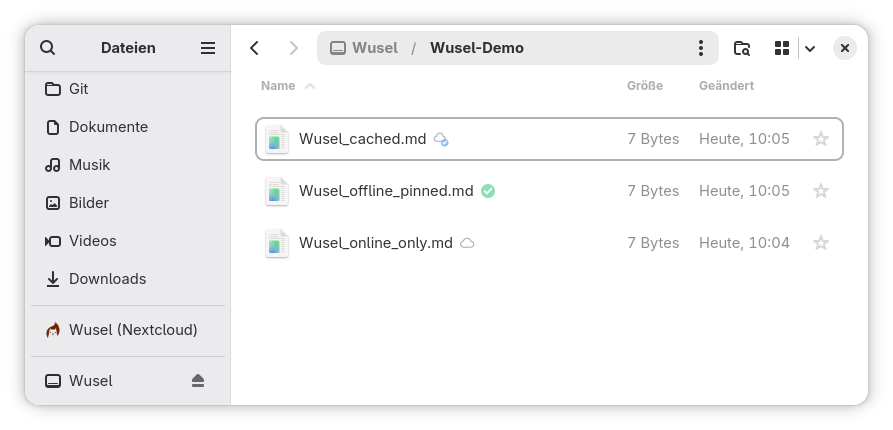
Every state gets a distinct, always-visible emblem — the OneDrive model, rather than marking only the exceptions. Current Adwaita has pruned its stock emblem set, so the Nautilus extension ships its own icons, installed into the hicolor theme:
| State | Emblem |
|---|---|
|
A cloud — lives on the server, not downloaded. |
|
A cloud with a check — downloaded now, but still evictable. |
|
A green check — kept offline, always available. |
|
A cloud with a green down-arrow — kept offline, still to be fetched. |
|
A green check with a warning — kept offline, but out of date. |
|
An up-arrow — a local edit awaiting upload. |